Pages

Showing posts with label Extensions. Show all posts

Friday, November 04, 2016

Code changes - NAV 2016 to NAV 2017 - Tips, Tricks & Facts #5

Hi guys, I am gonna talk about the code changes that I liked in NAV 2017 and you must know about them too.

Coding in NAV 2017 is better, as expected.

Just to give an overview. I will cover some examples as follows,


1. Codeunit 80 - OnRun Trigger - This trigger used to be a home of like more than a thousand lines of code. Well now, it has been decreased to a hundred lines of code, give or take. Check the image below,


Saturday, October 15, 2016

Unpacking NAV App Package OR Unpack an Extension in Dynamics NAV 2016 - Tips, Tricks & Facts #4

Hi guys,

Let's take a scenario where an extension named 'My_Location_Extension' was developed, published and installed by a developer named 'Jack' on a NAV Server Instance named 'NAVDemoService'. A few days later Jack is out of reach and 'Jill' (another developer) wants to know that what objects were modified and created by Jack and packaged in My_Location_Extension.

These kind of scenarios happen in real world. I tried to find a PowerShell cmdlet for unpacking a NAV app package but no success.

So, what to do? Other questions which arise in such a situation are,

Sunday, October 09, 2016

What happens to the Data after an Extension is uninstalled in Dynamics NAV 2016 ? - Tips, Tricks & Facts #3

Hi Guys, After my last post on extensions, I got questions from my blog readers that,

What happens to the data if we uninstall an extension in NAV 2016? 

As in, If we uninstall the extension then what about the data in the fields which were packaged in that extension.

Take a look at the screenshot below,

After uninstalling the extension we can see some new tables in our database.


The new tables are marked in orange and the new fields are marked in blue in the image above.

One table is created in SQL per existing Company in the database and this happens only when you have added new fields in a table which was packaged in your extension.

Yes, the names of these newly created tables are confusing but each table name is prefixed with AppData. All the data which was in the fields which were packaged in the extension exists in these tables.

Before uninstalling the app, I created a Location card in NAV as shown below,


Take a look at the table data in SQL for this Location record (before the app was uninstalled),


Now, take a look at the table data in the new table which was created after uninstalling the app,


This newly created table has two set of fields in it,
  • Primary Key fields (of the table in which new fields were added).
  • New Fields which were packaged in the extension.
In my demo scenario, 3 fields are created in the new table
  • Code (Primary key of Location Table)
  • Created By (Added on ID 50000 in Location Table and then packaged in extension)
  • Created Date (Added on ID 50001 in Location Table and then packaged in extension)
And last but not the least, when I uninstalled my Location extension I left DoNotSaveData unchecked so that my data is saved in SQL. See the screenshot below to know How to uninstall an extension,


If I mark DoNotSaveData parameter as True when I uninstall my app then obviously my data will not be saved in SQL and obviously no new AppData prefixed name tables will be created.

Keep Learning!!
& don't forget to post comments and doubts in comments section, I will be happy to answer them!

Tuesday, September 27, 2016

New Development Environment for NAV unleashing this Christmas! :D

Checkout this picture taken by Kauffmann in Directions US.


I will talk about this picture later. First things first.. So, I was scrolling through my twitter feed, seeing updates from people and companies about NAV Directions. And the picture below dropped my jaw. LITERALLY!
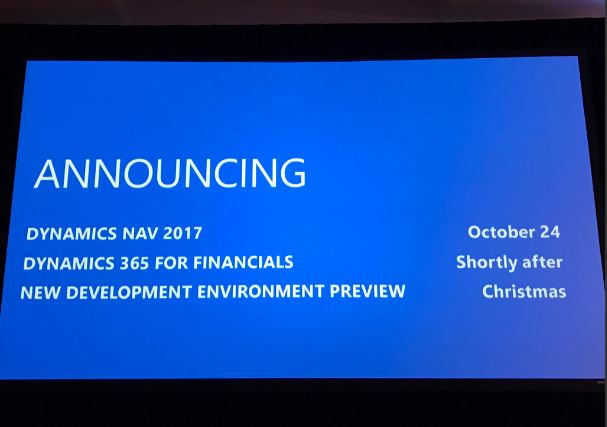
No, It is not about NAV 2017 or Dynamics 365. I am looking forward to these too but it is the 3rd thing mentioned in this picture, new development environment, which got me so excited, thrilled, delighted and what not!! Thank you Microsoft for exciting us every time we try to settle. Thank you, seriously!

Below is the stuff that Waldo and Kauffmann have shared in their blogs. Thank you both for sharing the knowledge with us.

So, as you all must have already got to know that in NAV 2017, we will be working with a new tool known as VS Code editor. The VS Code editor will become the preferred way of doing modifications in the future. Eventually, it will enable us to do any kind of modification that we can do today. 

Another picture taken by Kauffmann in Directions US. These pictures are interesting!!


The capabilities of Extensions have been immensely improved in NAV 2017. All object types are available now .. and more. (I so want to explore this “more” part, I know you guys will agree with me here!)

In short this will be the new stuff available to us,

-          Additional Object Types in Extensions:
o   Reports
o   XMLPorts
o   Queries
o   Custom report templates

-          Default and starting data

-          Multilanguage captions

-          Support for .Net Framework Add-Ins
o   .NET interop types executed on the server
o   Client-side JavaScript
o   WinForms extensibility control add-ins

-          Support for web services

-          Restore and backup data in extensions
o   NAVAPP.RESTOREARCHIVEDATA
o   NAVAPP.DELETEARCHIVEDATA

-          Updated PowerShell to publish Extensions
o   Publish to SQL db on Azure SQL

-          Installing Extensions
o   Users can install/uninstall from Extensions Mgt page.

There is a lot to deep dive into, check the full posts here and here. Do check these posts, they have a lot more interesting stuff, like a new datatype called "MediaSet" coming in NAV 2017. (I will say no more, check the posts :) go go!)

The “New developer Experience“ is not going to be released in the upcoming release. It’s only going to be there in preview at Christmas. There must be a lot of questions arising, I know, check these posts to get all the knowledge about what’s really new in NAV 2017.

Grateful because i am expecting that there will be so much to learn soon enough. Well, Let's see. Christmas will be so merry this time if we get what we all are expecting by that time.

#Excited #KeepLearning #KnowledgeForNAVTechies
Cheers!
Ishwar

Saturday, September 24, 2016

Implement Extensions in NAV

Below is the easiest way I found to implement extensions in NAV.

Let's Start!

The above diagram shows how extensions work and the idea behind bringing extensions into existence. Extensions can be installed independently on different tenants belonging to the same service and each tenant will have only the functionality of the extensions installed on it.

Extensions can co-exist in a tenant and independently as well. In the above diagram Extension 1 and 2 are installed on Tenant 1 and Tenant 2. While Extension 3 is only installed on Tenant 3 and likewise.

7 Easy steps to implement extensions in NAV are as follows: